GlusterFS Installation on Ubuntu for Data Replication

Written by
Admin
Admin
Updated on
August 7, 2024
August 7, 2024

GlusterFS is a distributed file storage system developed by Gluster Inc., now part of Red Hat. GlusterFS is designed to handle large data volumes and provides scalable and elastic storage solutions for various needs, such as cloud storage, file storage for virtual servers, and data storage for applications that require high throughput, also providing storage for backup, replication, web app.
This a component on GlusterFS
Brick: The basic storage unit in GlusterFS, which is a directory on a server.
Volume: A collection of bricks managed as a single storage entity.
Translator: A software component that modifies how data is accessed and stored in the file system.
Before installing GlusterFS, we need to have at least 2 nodes of GlusterFS and attach storage to mount on directory both node.
Environment :
Operating System : Ubuntu 24.04 LTS
Software : GlusterFS 7
Node : 1 Client, 2 GlusterFS Nodes
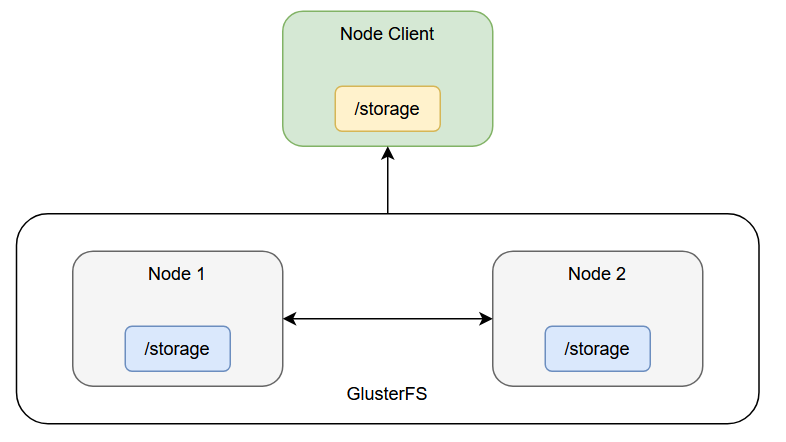
Add host client and both node on /etc/hosts (make sure you change the hostname on your node and client)
gluster1 192.168.50.136
gluster2 192.168.50.4
client-gluster 192.168.50.231
Create directory storage
mkdir -p /storage
Create Volume Partition to mount to directory /storage (you can adjust the volume based on your system)
fdisk /dev/sdb1
it should be appear this message, you just have to follow the promt
Welcome to fdisk (util-linux 2.31.1).
Changes will remain in memory only, until you decide to write them.
Be careful before using the write command.
Device does not contain a recognized partition table.
Created a new DOS disklabel with disk identifier 0x06091fe8.
Command (m for help): n
Partition type
p primary (0 primary, 0 extended, 4 free)
e extended (container for logical partitions)
Select (default p): p
Partition number (1-4, default 1):
First sector (2048-4194303, default 2048):
Last sector, +sectors or +size{K,M,G,T,P} (2048-4194303, default 4194303):
Created a new partition 1 of type 'Linux' and of size 2 GiB.
Command (m for help): w
The partition table has been altered.
Calling ioctl() to re-read partition table.
Syncing disks.
format to ext4 file system
mkfs.ext4 /dev/sdb1
mount the volume to /storage directory
mount /dev/sdb1 /storage
now add this line to /etc/fstab in case your server stoped or restarted, the volume still persist
/dev/sdb1 /storage ext4 defaults 0 0
add repository glusterfs-7
add-apt-repository ppa:gluster/glusterfs-7
apt update
Install glusterfs on both node and start glusterfs service
apt install glusterfs-server
systemctl start glusterd
systemctl enable glusterd
systemctl status glusterd
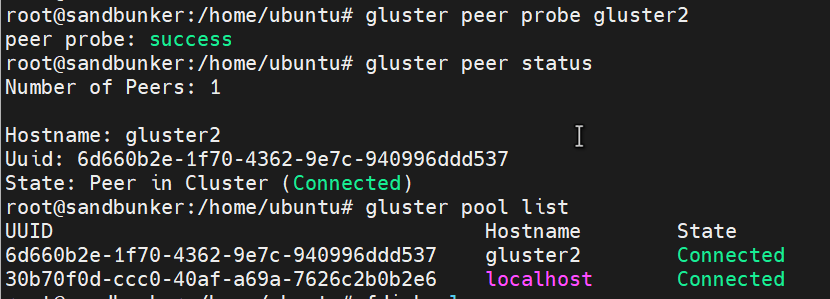
Add node 2 to storage pool
gluster peer probe <hostname node2>
gluster peer status
gluster pool list
now the storage pool on node 1 and node 2 is already connected in the pool list
In this case i am using Distributed Replicated Glusterfs Volume Architecture, you can create volume using this command
gluster volume create volume-01 replica 2 transport tcp gluster1:/storage gluster2:/storage force
gluster volume start volume-01
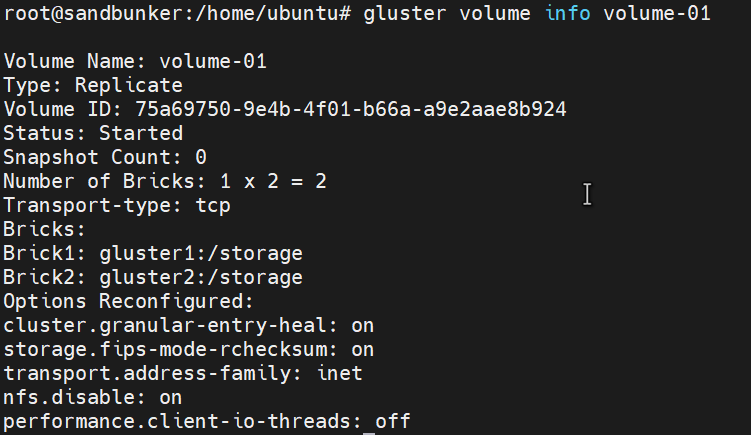
gluster volume info volume-01
the following information should be like this

Add glusterfs 7 repository so you can install glusterfs-client
add-apt-repository ppa:gluster/glusterfs-7
apt update
apt install glusterfs-client
After installing glusterfs-client, you can create /storage directory and mount glusterfs to /storage
mkdir -p /storage
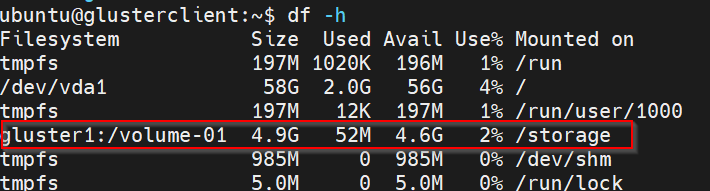
mount -t glusterfs gluster1:/volume-01 /storage
here is the following result
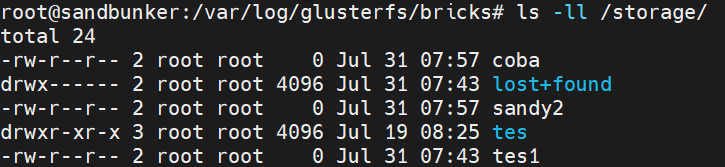
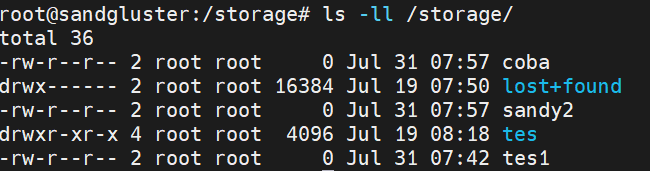
After installing mounting hte volume, now you can try create file from client, like example touch <file_name> , here is the following result on node 1 and node 2, we can see the file created from glusterclient is being replicated on both node.